


Indeed Job Search
4.7296.43K Reviews
App Specs
- Version
- 300.0.0
- Updated On
- License
- Free
- Downloads
- 100,000,000+
- Developer
- Indeed Jobs
- Categories
- Business
- Platform
- Android, iOS
Screenshots
 Analysis by AppCompare
When I’m looking for work, the hardest part is often not finding listings; it’s keeping the search focused enough to make good decisions. Indeed Job Search is a business app from Indeed Jobs that brings job discovery, saved listings, and applications together on a phone. It is free to use, and its Everyone age rating makes it broadly accessible. I find it most useful as a practical starting point for a search, rather than a substitute for checking whether each role and employer is right for me.
A sensible routine for a busy job search
I get more out of the app when I begin with a clear idea of what I want: a role, a location, and a few requirements I’m not willing to compromise on. From there, I can browse results, narrow them with filters, and save plausible openings instead of trying to apply to everything I see. That small pause matters. A job title can sound familiar while the actual duties, schedule, or location make it a poor fit.
A realistic use case is checking listings during a commute or a lunch break, saving a few promising roles, then reviewing them later when I can give the details proper attention. The app makes it convenient to move between discovery and applying, but I wouldn’t treat a quick phone scan as the final decision. I read the full description and compare the requirements with my experience before sending an application.
Guides and Analysis on Indeed Job Search
Make recommendations and alerts work for you
Personalized recommendations can help surface roles I might not have searched for by exact title, especially when my experience could fit several kinds of work. They are most useful as prompts, not instructions: I still check the duties, location, and qualifications rather than assuming a recommendation is a match. If the suggestions feel too broad, I revisit my profile and search choices before drawing conclusions about the quality of the results.
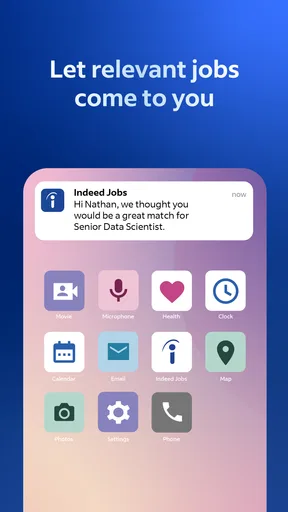
Alerts are better when they reflect a real priority. I’d set them around a role and place I would genuinely consider, then use saved jobs as a short review queue. If every loosely related search generates a notification, the feature can turn into noise and make it easier to overlook a strong opening. A repeatable habit—check alerts, scan the details, save or dismiss, and apply only when ready—keeps the phone from dictating the pace.
Search details worth checking
The filters for location, salary, and company help me reduce a broad search to something more manageable. I use them to compare the shape of the opportunity, not as guarantees that every result will meet my expectations. Salary information and company reviews can add useful context, but I consider them alongside the actual posting and my own priorities. A promising headline is only a reason to investigate further.
Indeed Job Search is particularly handy for people who want to browse across employers in one place and keep applications moving without sitting at a computer. It may be less suitable if you already have a short list of specific employers and prefer to apply through their own career pages, or if you need detailed career coaching rather than a job-search tool. In those cases, a company’s own site or a human adviser can be a better next step.
Worth Reading Before You Choose

Baby Panda World Brings Quick Play to Modern Phones, but Its Game Library Feels Busy

ESPN’s Live Game View Makes Following Close Games Easier

QuizzLand Review: A Good Fit for Short Trivia Breaks, Not Every Player

Basketball Stars: Multiplayer Is Fast, but Can It Recover When Matches Go Wrong?

WEBTOON Turns Phone Updates Into a Better Reading Routine

Link to Windows Runs on Shared Habits, Not Social Feeds
First Impressions and Interface
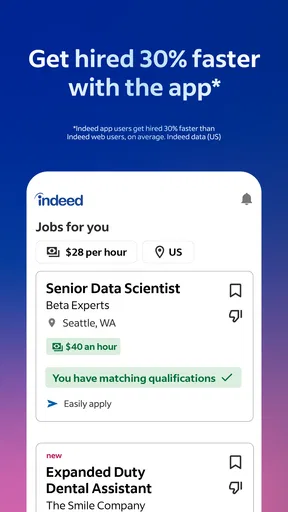
Firing up the app for the first time, I was met with a clean and user-friendly interface. It's straightforward, which means you can get right down to business without a learning curve. The home screen is your gateway to a world of job opportunities, with a search bar that takes center stage. Whether you're a seasoned job seeker or a newbie, the layout makes it easy to dive in.
Features That Stand Out
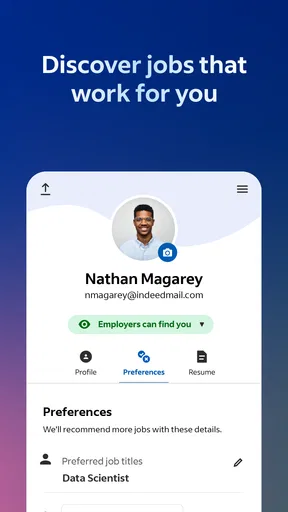
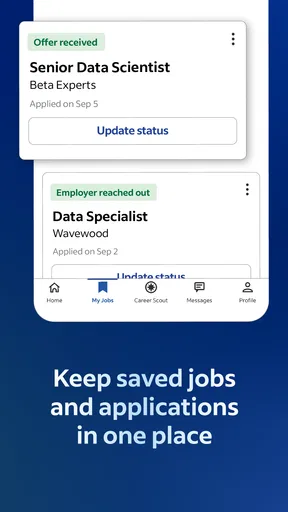
One thing I love about this app is the personalized job recommendations. Once you’ve set up your profile, the app works its magic to suggest positions that match your skills and interests. It’s like having a job-hunting assistant in your pocket. Plus, you can save jobs for later, which comes in handy when you’re on the go.
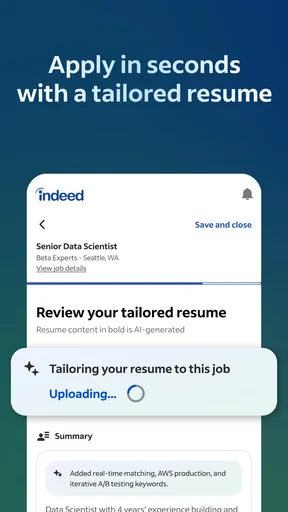
Another neat feature is the ability to apply directly through the app. You can upload your resume, tailor it to different job applications, and hit that apply button without fuss. It’s super convenient and saves you from the dreaded computer shuffle.
Smooth Searching Experience
Let’s talk about the search function. It’s robust, allowing you to filter jobs by location, salary, company, and more. The app even provides company reviews and salary insights, giving you a clearer picture of what to expect. This transparency is a game-changer in weighing your options.
Notifications and Alerts
The app’s notifications are a life-saver. Set up alerts for new job postings matching your criteria, and you’ll never miss an opportunity. It’s like having a friend who’s constantly on the lookout for you, without being annoying.
Where convenience has limits
Applying from a phone saves effort, but I wouldn’t rush through every application just because the button is close by. A reusable resume can speed up the process, yet each role deserves a quick check for the skills and experience it emphasizes. If the posting asks for a particular background, I make sure my application makes that connection clear rather than relying on a generic document. The trade-off is simple: less computer shuffling, but still a need for careful editing.
I also treat a listing as an invitation to research, not a complete picture of a job. Reviews and salary insights can help me form questions and spot patterns, but neither replaces reading the employer’s description closely or asking direct questions during a hiring process. When an opportunity is important, I keep my notes about the role and employer separate from the app so I can compare several options without relying on memory.
How it fits beside other ways to apply
Compared with visiting individual company career pages one by one, Indeed is more convenient when I’m exploring a field or don’t yet know which employers are hiring. A company site can be the better choice when I already know where I want to work or need to check the employer’s own description and application process. I see the app as a broad search desk: useful for finding possibilities, while a direct employer source can provide a final cross-check.
It also differs from asking friends or a career adviser for leads. Those conversations can offer personal context, referrals, or tailored guidance that a listings app cannot provide. Indeed is stronger for independent browsing and keeping potential roles together; personal advice is stronger when I’m unsure how to position my experience or choose between paths. I’d combine them when a career decision needs more than a list of openings.
Who will get the most from it
I’d recommend it to someone actively comparing openings, changing industries, or fitting applications around work and family commitments. The combination of search filters, recommendations, saved jobs, and in-app applying supports a practical routine without requiring a desktop at every step. It can also suit a more passive search, as long as alerts stay selective and checking the app doesn’t become a substitute for deciding what kind of move is worthwhile.
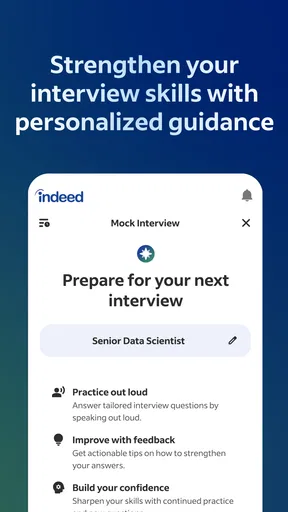
On the other hand, it may frustrate someone who expects every recommendation to be perfectly tailored or wants the app to make career choices for them. It is also not the right sole resource if the main need is interview practice, resume coaching, or direct contact with a particular employer. I’d use it to locate and organize opportunities, then turn to other sources when the task shifts from searching to preparing or evaluating an offer.
A steady approach beats constant scrolling
One useful habit is to review saved listings in batches rather than leaving them to pile up. For each one, I ask whether the role, location, and stated requirements still fit; then I either apply, keep it for later, or remove it from consideration. This makes saved jobs a decision tool instead of a second endless feed. It also helps me notice which search terms are bringing relevant results and which ones need adjusting.
For an experienced user, the advantage is not a secret shortcut but a repeatable sequence: search with a purpose, narrow the results, save only credible options, and give each application a final read before sending. That approach makes recommendations and alerts easier to manage too, because I know what I’m looking for. The app can streamline the mechanics, while judgment still belongs to the person applying.
What to expect from the service
The app has a 4.7 average from around 11 million ratings, and it has been installed over 100 million times. Those figures suggest it is a widely used job-search option, though they don’t tell me whether a particular listing is suitable or how quickly any one person will find work. I’d judge it by whether its results match my own search and whether its tools help me apply thoughtfully.
It is currently at version 260.1 and supports Android 7.0 and later. For someone choosing a free tool, that makes it straightforward to try without making the app itself a financial commitment. The more important commitment is the time spent reviewing opportunities, keeping profile details current, and tailoring applications where it matters.
Ending Thoughts
So, is Indeed Job Search worth downloading? Absolutely. It brings simplicity and efficiency to the job search process, with features that cater to both active and passive job seekers. The ability to apply for jobs with a few taps is a major plus, and the personalized recommendations keep you engaged.
If you’re in the market for a new job or just exploring what’s out there, give this app a whirl. It might just be the tool you need to land that dream gig. Happy hunting!
My verdict on using it well
I think Indeed Jobs has made a useful tool for the practical middle of a job hunt: finding openings, comparing the basics, saving candidates, and taking the next step from a phone. Its biggest strength is convenience across a broad search; its main limitation is that convenience can’t replace careful reading or personal career advice. I’d keep the app in my routine, but I’d use it with a focused search and a deliberate final check before applying.
In short, it’s a strong option if you want one place to explore roles and manage the early stages of applying. If your needs are narrower, a particular employer’s careers page may be more direct; if you need guidance, a person with relevant experience may help more. Used for what it does best, Indeed Job Search can make a job search feel more organized without pretending to make the decisions for you.
Pros
- User-friendly interface for easy navigation.
- Wide range of job listings available.
- Customizable job alerts keep you updated.
- In-app resume builder for quick applications.
- Advanced filters to refine job searches.
Cons
- Limited sorting options for search results.
- Occasional duplicate job listings.
- In-app advertisements can be distracting.
- Some job postings lack detailed descriptions.
- Location services may not be precise.
FAQs for Indeed Job Search
What is Indeed Job Search?
Indeed Job Search is a mobile application designed to help users find job listings quickly and efficiently. It aggregates job postings from thousands of websites, providing a comprehensive search experience. Users can apply directly through the app, upload their resumes, and receive job alerts tailored to their interests.
How do I create an account on Indeed Job Search?
To create an account on Indeed Job Search, download the app from the Google Play Store or Apple App Store. Once installed, you can sign up using your email address or connect through a Google or Facebook account. Creating an account allows you to save job searches and set up customized alerts.
Is Indeed Job Search free to use?
Yes, Indeed Job Search is free to download and use. Users can search for jobs, upload resumes, and apply to positions without any cost. However, employers may have costs associated with posting job listings on the platform. There are no hidden fees for job seekers using the app.
Can I apply to jobs directly through the app?
Yes, Indeed Job Search allows users to apply directly to job listings within the app. Once you find a job that interests you, you can click on it to view more details and submit your application. Ensure your resume is uploaded to streamline the application process.
How do job alerts work on Indeed Job Search?
Job alerts on Indeed Job Search notify you of new job postings that match your criteria. To set up alerts, perform a job search with your preferred filters, and then save that search. You’ll receive notifications or emails when new jobs matching your criteria are posted, helping you stay updated.


